
Step 1 of 3 — Your number
Create a Tiger Exchange Account
Mobile number, password, SMS code. Nothing else is asked on the first screen.
Use a number you can read an SMS on right now.
OR SKIP THE FORM
Get a Ready-Made IDAlready registered? Tiger Exchange Login
Tiger Exchange › Tiger Exchange Register
Tiger Exchange Register — Free Sign Up, ID Live the Same Day
Registering on Tiger Exchange takes one mobile number, one password and one SMS code. That is the whole first screen. No PAN, no bank statement, no e-mail address, no document upload before you are allowed in. Those questions only turn up later, and only if you push a withdrawal past the desk limit. Most people who search tiger exchange register are standing at that form right now with the keypad open, so this page runs through it field by field, says what gets rejected, and gives the real timings for activation.

Two ways in, same destination. Either you fill the Tiger Exchange form yourself, which is quicker if you have used a sports exchange before, or you message the Tiger Exchange desk on WhatsApp and get an ID handed over with the username and password already set. A lot of Indian punters take the second route, mostly because the first deposit gets arranged in the same chat. Both give you the identical account type, the same cricket markets, the same casino rooms.
What the Tiger Exchange Register Form Actually Asks For
Short list. The Tiger Exchange sign-up screen has five inputs and one of them is optional, which surprises people who expected a document wall on page one.
| Field | What goes in | Gets rejected when |
|---|---|---|
| Country code | +91 is preselected for India | Rarely an issue, since it is a dropdown and not typed |
| Mobile number | 10 digits, no spaces, no leading zero | You paste a number that already carries +91, making 12 digits |
| Password | 8 characters or more, letters and digits mixed | Under 8, or all letters, or your own mobile number |
| Confirm password | Exactly the same string | Autofill drops an old saved password into the second box |
| Referral code | Optional. The code an agent gave you | Expired codes fail quietly, the form just ignores them |
Notice what Tiger Exchange does not ask for. No full name, no date of birth, no city, no e-mail. Tiger Exchange treats the mobile number as the account identity, which is why one number equals one account, and why a typo in that field is the single most expensive mistake on this page. Register with a number you cannot receive SMS on and the password-reset route is shut to you later; support then has to move the account by hand, which takes a day rather than a minute.
Tiger Exchange Register Step by Step — The Official Sign Up Route
Four steps, and the middle two are where people lose time. Do them in this order and the whole thing is over before the next over starts.
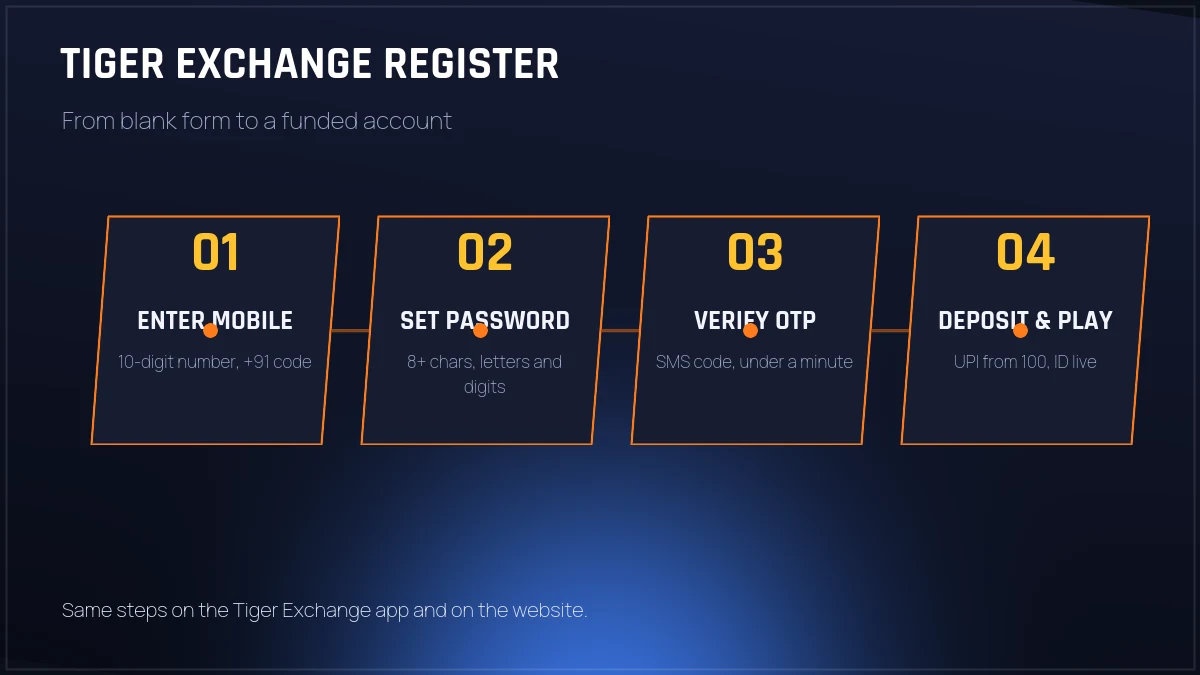
After step four the screen usually jumps to a deposit prompt rather than to the cricket board, and that throws a lot of first-timers who assume something broke. Nothing broke. The Tiger Exchange account is already created at that point; the deposit box is just the next thing the system wants from you. Close it if you like, wander into the in-play list, and fund the ID an hour later.
If the form ever stalls on submit, do not tap it five more times. Each tap can count as a fresh attempt and the number gets locked out for a few minutes.
Mobile Verification and OTP Timing on Tiger Exchange
The SMS code is the only verification at Tiger Exchange sign up, and it is six digits. Delivery is quick when it works. Sometimes it arrives before the spinner has finished, sometimes it takes the full sixty seconds on a weak signal in a stadium car park. Both are normal, neither means the registration failed.
Resend unlocks after sixty seconds. Use it once, not three times; multiple requests queue behind each other and the codes start invalidating one another, so the first one you type has already expired by the time you finish typing it. If two resends produce nothing, the number is probably sitting under a DND rule with your operator, and the sensible move is to register through the Tiger Exchange WhatsApp desk instead — that route never touches SMS at all.
One detail worth knowing. The Tiger Exchange register OTP and the login OTP are separate things. Registration verifies the number once, for good. Later, at login, you get a choice between password and OTP, and most regulars end up on password because its faster when a match is already running.
Password Rules That Get Rejected at Tiger Exchange Sign Up
The Tiger Exchange register form is not fussy, but it does refuse a few things, and it refuses them without much explanation, which is why people sit there re-typing the same rejected string and getting angrier.
Accepted by Tiger Exchange
Eight to twenty characters · at least one digit · mixed case fine but not compulsory · symbols allowed · spaces at the ends trimmed automatically.
Refused at sign up
Under eight characters · your own mobile number as the password · a string that matches an old account on that number · a confirm box that does not match character for character.
A practical habit: type the password into the first box, tap the eye icon to reveal it, then type it into the confirm box by hand instead of pasting. Password managers are the usual culprit behind a mismatch you would swear is identical. Once the Tiger Exchange account exists you can change the password any time from the account menu, and the change applies at the next login rather than killing the session you are in.
Register Yourself or Take a Ready-Made Tiger Exchange ID
This is the fork that decides how your first hour goes. Neither option is better in the abstract. They suit different people, and plenty of punters use both at different times.
| Self-registration | WhatsApp ready-made ID | |
|---|---|---|
| Time to account | 2-3 minutes | About 10 minutes, within desk hours |
| Who sets the password | You do | Desk sets it, you change it after first login |
| First deposit | You do it from the funding screen | Arranged in the same chat, UPI details shared there |
| Best for | Anyone who has used a sports exchange before | First-timers, or anyone who wants the deposit sorted in one go |
The ready-made route exists because the deposit, not the form, is where new users actually get stuck. A Tiger Exchange agent opening the ID by hand sends you the username, a temporary password and the payment details in one message, and you are a single login away from a funded balance. The trade-off is that you are on the Tiger Exchange desk clock. At 2am on a weeknight the reply can take a while; during an IPL evening it is usually minutes.
Go the self-registration way and you can still message the desk afterwards for deposit help, with nothing more than your username. They do not need your password for that. Nobody at Tiger Exchange should ever ask you for it, on any channel, at any point.
Common Tiger Exchange Register Mistakes and How to Undo Them
Five things go wrong repeatedly on the Tiger Exchange register screen. Four are fixable in a couple of minutes. The first one is the painful one.
The OTP goes to a stranger and the Tiger Exchange registration cannot complete. There is no self-serve fix, because the account is keyed to the number you typed. Message the desk with the correct number before trying again, otherwise the wrong number sits there half-registered and blocks a clean retry.
Tiger Exchange allows one account per mobile number. The form will not spell out that a duplicate exists, it simply fails. If you registered months ago and forgot about it, use forgot-password on that number instead of creating anything new.
Add a digit and take it past eight characters. That clears it nine times out of ten. Re-submitting the same string hoping the form changes it's mind is a waste of a minute you could spend on the market.
Codes are case-sensitive, and a stray space from copy-paste kills them. The Tiger Exchange form does not complain — it registers you without the code attached, and the code cannot be added later.
Aggresive blockers occasionally stop the OTP box rendering at all. Switch the blocker off for the page, or register in the Tiger Exchange app, where the problem does not exist.
A sixth one, rarer. Somebody registers, never funds the ID, drifts off, and comes back in March convinced the thing has lapsed. It has not lapsed. A quiet Tiger Exchange account simply sits there, and the same number with the same password walks you back in.
Registering on the Tiger Exchange App or on the Website
Same form, two doors. On the website the Tiger Exchange register box opens as an overlay, so the page behind it stays where it is and you can close it without losing your place. In the Tiger Exchange app it is a full screen with the keypad already up, which is a small thing that saves a real amount of fumbling on a phone.
The practical difference shows up afterwards, not during. An app registration keeps the number stored, so the next login is password-only. A browser registration will keep it too, but only if you let the browser save it, and an incognito tab keeps nothing at all. If you register once in incognito and then cannot remember which number you used, you are into the forgot-password loop for no good reason.
Where both are identical: the OTP, the password rules, the deposit prompt, and the account you end up with. Nobody gets a better Tiger Exchange ID for registering on one rather than the other, and there is no separate app-only signup bonus, whatever a forwarded message might claim.
What the Tiger Exchange Account Shows on Day One
First login after registering and the screen is quieter than people expect. A balance row reading zero, the sports list down the side with cricket at the top, the casino tab beside it, and a my-bets section with nothing in it. That is the whole Tiger Exchange dashboard until money lands.
Two things are worth opening on day one. The account menu, where the password change and the withdrawal details live. Filling the bank or UPI detail in early saves you doing it at the exact moment you want a payout. And a single cricket match, so you can see how the Tiger Exchange board stacks back and lay prices side by side before a stake is involved.
Limits on a brand-new Tiger Exchange account are modest and they lift on their own with use. Nobody will tell you the exact ceiling, and honestly it varies by desk, but a first-week withdrawal in the low thousands goes through without a question being asked.
How Long Tiger Exchange Activation Takes After Registering
Three different clocks run after a Tiger Exchange registration, and people mix them up constantly.
- Account created — instant, the second the OTP clears. You can read the Tiger Exchange markets straight away.
- Balance live — a UPI top-up on an ordinary evening shows up while you are still reading the market list. Bank transfer is the slow lane and can eat most of an hour.
- Full limits — after the first deposit and withdrawal cycle has gone through. New accounts sometimes sit on a lower withdrawal ceiling for the first few days.
Ask how long Tiger Exchange registration takes and you get two numbers, not one. The account: under three minutes. The first real bet: closer to twenty, because the money has to travel. IPL evenings stretch that second number. A Tuesday afternoon shrinks it until the deposit beats the form.
What to Do in the First Ten Minutes After You Register
The account is open. Now do these, roughly in this order, before you go anywhere near a live market.
- Log out and log back in once. It confirms the password you set is the password that saved — far better to find that out now than at 11pm during a chase.
- Fund the account with a small first deposit. Plenty of people start at 500. There is no reason to put a large amount into a Tiger Exchange ID you have not used yet.
- Open one cricket match and read the board for a few minutes without staking anything. The back and lay columns move every over; get used to that speed first.
- Do a small test withdrawal inside the first week. It is the only real way to know your payout route works, and it usually lands in twenty to forty minutes.
Want to practise before real money goes in? The demo route is separate from registration — a Tiger Exchange demo ID runs on play balance and needs none of the above. Some punters keep a demo open alongside the funded account, just to poke at a market they have not tried before.
Tiger Exchange Register FAQ — Quick Official Answers
How do I register on Tiger Exchange?
Five inputs, one code. Leave +91 as it is, key your ten digits by hand, choose a password with at least eight characters and one number, repeat it, drop in a referral code only if an agent gave you one. Submit, read the SMS, type the six digits. The Tiger Exchange account exists from that moment.
Is Tiger Exchange registration free?
Nothing is charged for the account itself, and the Tiger Exchange form never asks for a card. Cost starts at the funding step instead, where most new punters put in somewhere between 100 and 500 rupees over UPI, depending on what the desk has set that week.
How long does a Tiger Exchange ID take to activate?
A self-registered account is usable the moment the OTP clears, normally inside two minutes. Betting limits open after the first deposit is credited, which on UPI runs about five to fifteen minutes. A ready-made Tiger Exchange ID from the WhatsApp desk is handed over in roughly ten minutes.
Why is my Tiger Exchange register OTP not coming?
Nine times out of ten the number was typed wrong, or DND rules are holding the SMS. Wait the full sixty seconds, then use resend once. Check the spam or blocked-messages folder on the phone. If two resends fail, register through the WhatsApp desk instead and skip the SMS entirely.
Tiger Exchange Register — Cluster Notes in Ten Lines
- The broad query tiger exchange lands on the home board; tiger exchange register and tiger exchange sign up both land here, on the form walkthrough.
- Tiger exchange login is the return trip — same number, same password — and it lives on the Tiger Exchange login page.
- A tiger exchange id, or tigerexch id as people often type it, is what registration produces; the Tiger Exchange ID page covers the username format and account limits.
- Two typing habits show up a lot: tiger exchange official from people checking they are on a real address, and tiger exchange 365 from people who remember the older branding. Both roads end at the home board here.
- On the phone side, tiger exchange app, tiger exchange apk, tiger exchange 365 apk and tiger exchange 247 apk download all point at the same install file on the Tiger Exchange app page.
- Anyone asking how to register tiger exchange account, or how to create a Tiger Exchange ID in Hindi, gets the same four steps listed further up.
- A tiger exchange demo id is the no-deposit practice route and sits outside this registration flow entirely.
- Anyone typing tiger exchange whatsapp number has usually skipped the form on purpose — they want the ID desk, and the deposit sorted inside the chat.
- Tiger exchange register login and tiger exchange register app are the two related searches Google shows on this term — register first, sign in second, on web or app.
- Money questions such as tiger exchange deposit and tiger exchange withdrawal only matter once the account exists, and those timings are in the activation section above.